Connecting your repository.
Your repository is where your software's code lives, usually on a service such as GitHub or GitLab. Carth connects to it so the crew can read how your product is built and propose changes to it. This guide explains how to connect one, and exactly what the crew may and may not do with it.
Connecting a repository
For most companies this happens on the setup call: you tell us where the code lives, and we connect it together with you. You can also do it yourself at any time.
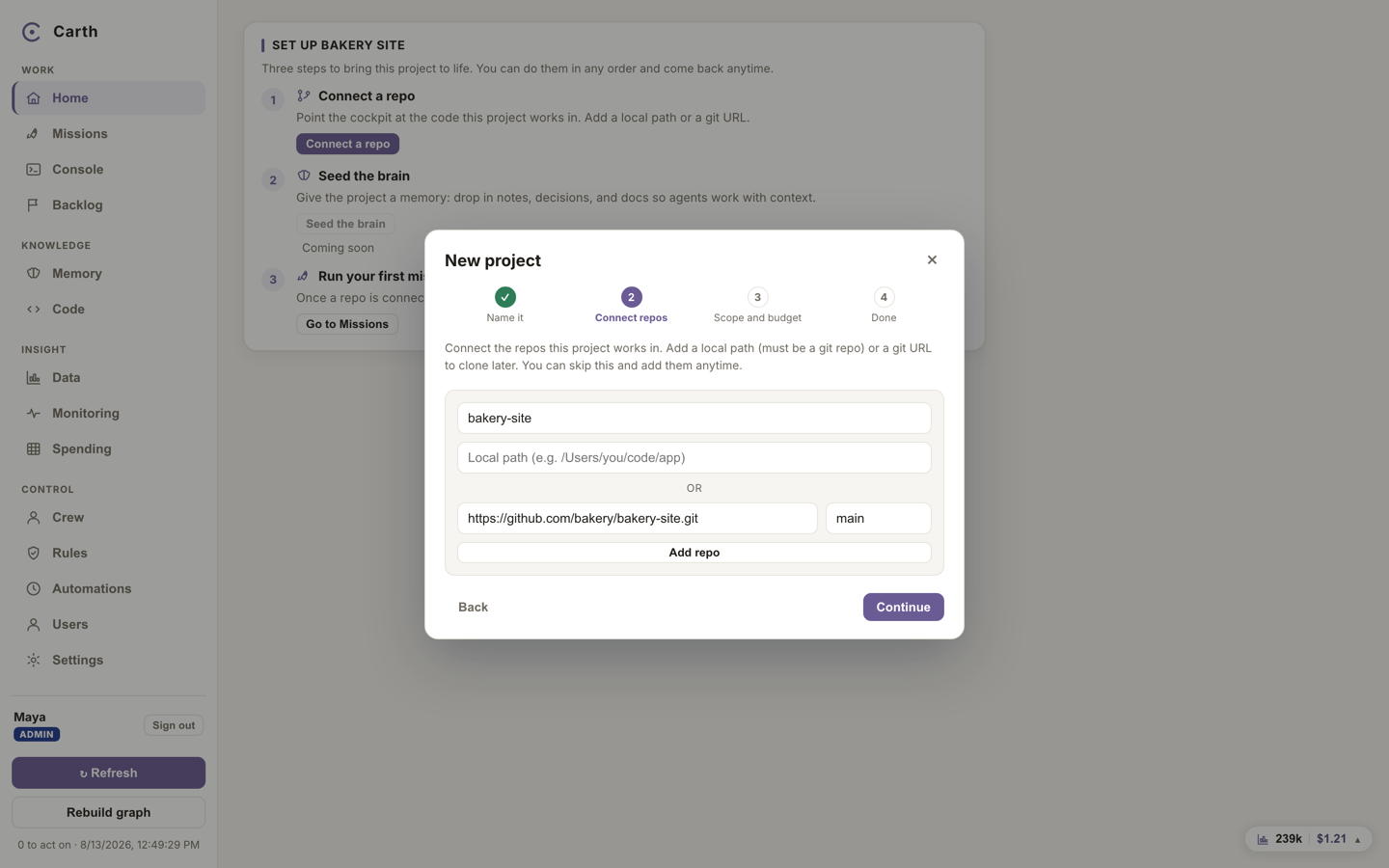
- Open Settings from the sidebar, or follow the setup prompt on a fresh workspace. The step is called "Connect a repo".
- Give the repository's git address, the same address a developer would use to fetch the code. Press "Add repo". You can connect more than one, and you can skip this step and come back to it any time.
- Choose what the crew may do with it. "Read-only" means no mission may change anything, which is the safest start. "Propose changes" means the crew may prepare changes, in isolated copies, for the repositories you name.
- Once connected, Carth reads the code and builds a map of it: which parts exist, how they connect, and which screens talk to which services. Every mission starts from that map instead of rediscovering your codebase, which makes the work faster and cheaper.
What the crew can do with it
- Read it. The planner reads your code before proposing anything, and the map keeps that understanding between missions.
- Work on isolated copies. When a mission builds something, each task gets its own worktree: an isolated working copy on its own mission branch. Parallel tasks never collide, and your main branch, the one your product runs from, is never touched by an agent.
- Show you the change. Every proposed change arrives as a reviewable diff, with evidence above it, waiting at your gate.
What the crew can never do
- It never pushes without approval. Agents cannot commit, push, merge, deploy or publish. Those are refused outright at the tool level, not merely discouraged, and each one is a separate, explicit human press with a name and a time on it.
- It cannot reach outside its copy. A writing agent is confined to its own worktree. If that copy cannot be created, the task fails and tells you why, and no agent is started at all. It is never quietly allowed to work in your main checkout instead, because that is precisely the failure that would matter. Work that never needed a copy of its own, research and analysis, carries on unaffected, and any task Carth is unsure about runs read only rather than in place.
- It cannot touch dangerous commands. Write-capable runs are refused a fixed danger list, including the commands that push code, delete files, or reach a database.
The full picture of these protections, including the audit trail and how your keys are stored, is in how your work is kept safe.
Repository size and your plan
Each plan carries a storage allowance, including a per-repository limit. If a repository is bigger than your plan allows, the connection is refused with a clear message showing the numbers, and nothing is left half connected. The limits per plan are listed in your account and plan.
If you have no repository yet
Carth still works without one. A workspace with no repository can run research, analysis and report missions, and the knowledge base and data questions do not need code at all. What needs a repository is code work: building and changing your product.
If your product exists but you do not know where its code lives, ask whoever built it, an agency or a past developer, for the git repository address. If you are starting from nothing, say so in your application: getting a first repository in place is exactly the kind of thing the setup call is for.
Next. With a repository connected, you are ready for the real thing: running your first mission.