Your account and plan.
Plans decide three things: how many people can sign in, how much storage your workspace carries, and how the account behaves at renewal. Prices are public, per company, in US dollars, billed monthly.
The plans
| Plan | Price | Seats | Projects | Agents at once | Made for |
|---|---|---|---|---|---|
| Trial | No longer offered | 2 | 1 | 2 | Withdrawn. New customers start with a demo instead. Trial licences already issued run to the end of their fourteen days. |
| Solo | No longer offered | 1 | 1 | 2 | Withdrawn. The plans on sale are Team, Business and Enterprise. Solo licences already issued keep working on their existing terms, and an install running with no licence token still behaves as Solo. |
| Team | $299 per month | 4 | 5 | 4 | Where most startups land: roles, per-role gates, budget caps and the audit trail. |
| Business | $799 per month | 10 | Unlimited | 8 | A leadership team in one cockpit, with priority support. |
| Enterprise | Talk to us | To fit | Unlimited | Up to the machine | Self hosted inside your own infrastructure, on your own AI provider keys, onboarding included. |
Team is the entry plan. Every plan starts with the same short application: see getting access. Enterprise is described in more detail on the trust page, because its whole point is where the data lives.
Seats
A seat is a person, never an agent: the crew does not consume seats. Your admin hands out seats from the Users area, and each seat carries a role that decides what its holder may do. When somebody leaves, revoking them frees the seat immediately for someone else, and everything they approved stays in the record under their name. Trying to add a person beyond your plan's seats is refused with a clear message before anything changes; the ways out are removing a seat you no longer need, or moving up a plan.
Agents at once
Your plan sets how many agents can be working at the same time. It is the only number that changes how the cockpit feels hour to hour, so it is worth understanding properly.
It does not limit how many missions you run, how many agents your crew has, or how much work you get through in a day. When every lane is busy, the next task waits in the queue and starts the moment one frees up. Nothing fails and nothing is lost; the mission simply takes longer.
The limit is there because an agent at work is a real process on a real machine, checking out your repositories and running your tests. Each lane is roughly half a CPU core and a gigabyte of memory, which is why raising it means buying the hardware to run it.
Changing it
Any admin can change the number in Settings, then Orchestration, at any time, up to your plan's ceiling. The change takes effect on the next task to start; work already running is never interrupted. To go above the ceiling you have three routes:
- Add lanes to your current plan, at $45 per lane per month, each bringing the half core and gigabyte it needs.
- Move up a plan, which is usually the better value once you want more than two extra lanes.
- Take a dedicated server, where you set the number yourself and the only ceiling is the size of the machine.
Add ons appear on your next monthly invoice and can be removed at the end of any month. See the add ons table for every option and its price.
Where your cockpit runs
Every customer runs in their own container, with its own memory, workspace and keys. Nothing of yours shares a process with anything of anyone else's, which is the reason the isolation is worth the hardware it costs.
You choose a region at onboarding, from EU West in Paris, EU Central in Frankfurt, the UK in London, or North America in Virginia. Your container and its backups stay in that region. Moving an existing cockpit to another region is a scheduled migration, quoted per case, and we tell you before any data moves.
On a dedicated server the whole machine is reserved for you in the region you name, and you may run as many projects on it as fit. On Enterprise, Carth is installed inside your own infrastructure against your own model provider, so we hold nothing: your code and your files stay on your machines, and the only thing that leaves is what a mission sends to the model provider you chose, on your own contract with them. The trust page goes through that in detail.
Renewal, and what suspension looks like
Your account is always in one of three states, and each is deliberately undramatic:
- Active. The normal state. The cockpit says nothing about the licence at all, because silence is the correct interface for a healthy account.
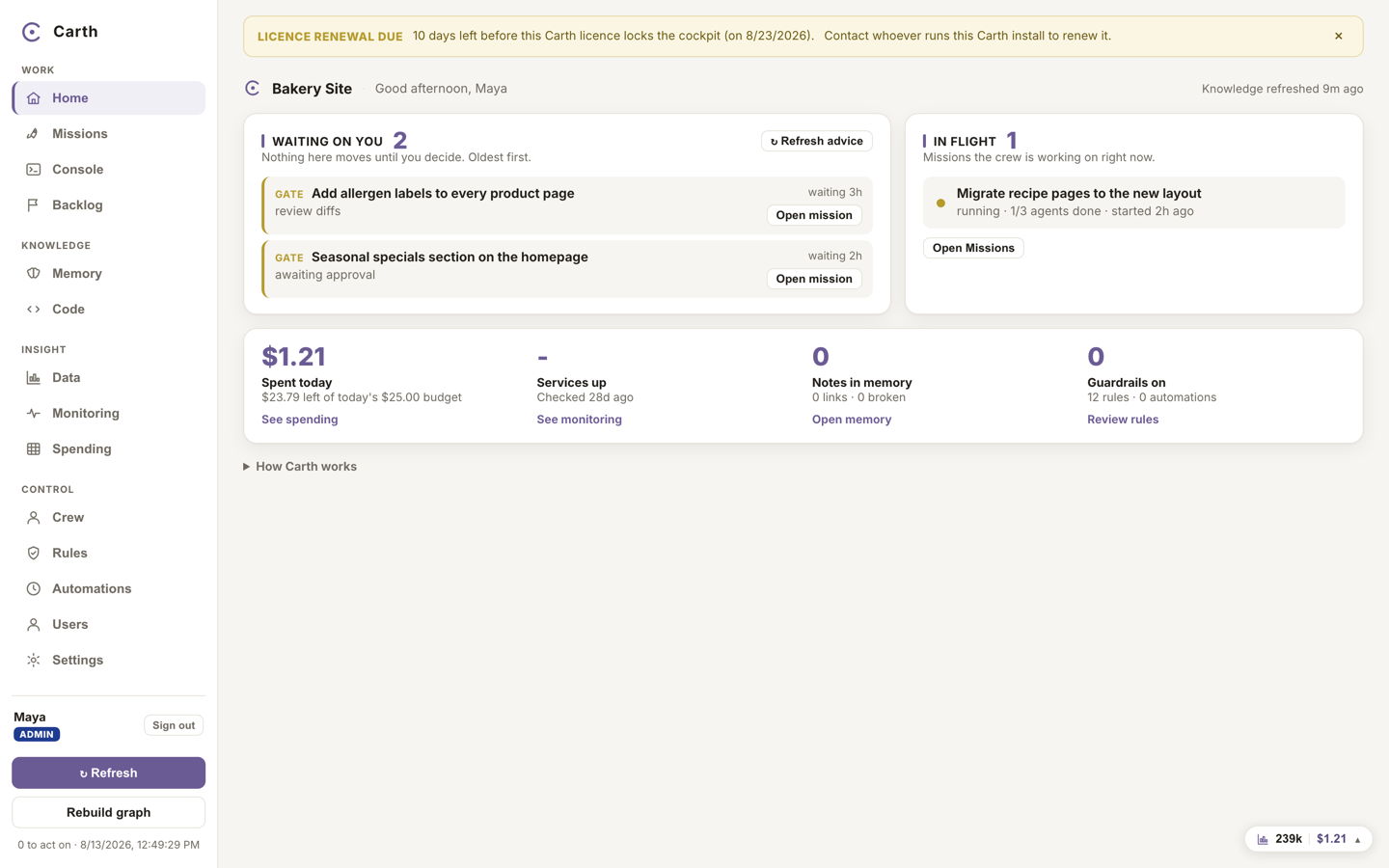
- Renewal due. When the term has ended, a short grace window opens, five days unless agreed otherwise. Everyone keeps working exactly as before; the only change is a dismissible banner counting the days left, with one renewal link.
- Suspended. When the grace window closes without a renewal, the cockpit locks. People who are not admins see the sign-in screen in its suspended form, with no way in. The admin can still sign in and gets one full-screen notice with the plan, the seat usage and the expiry date, so the one person who can fix it is the one who is told. Nothing is deleted: your data, your missions and your history are all still there, and renewing brings everything back as it was.
Storage limits, in plain words
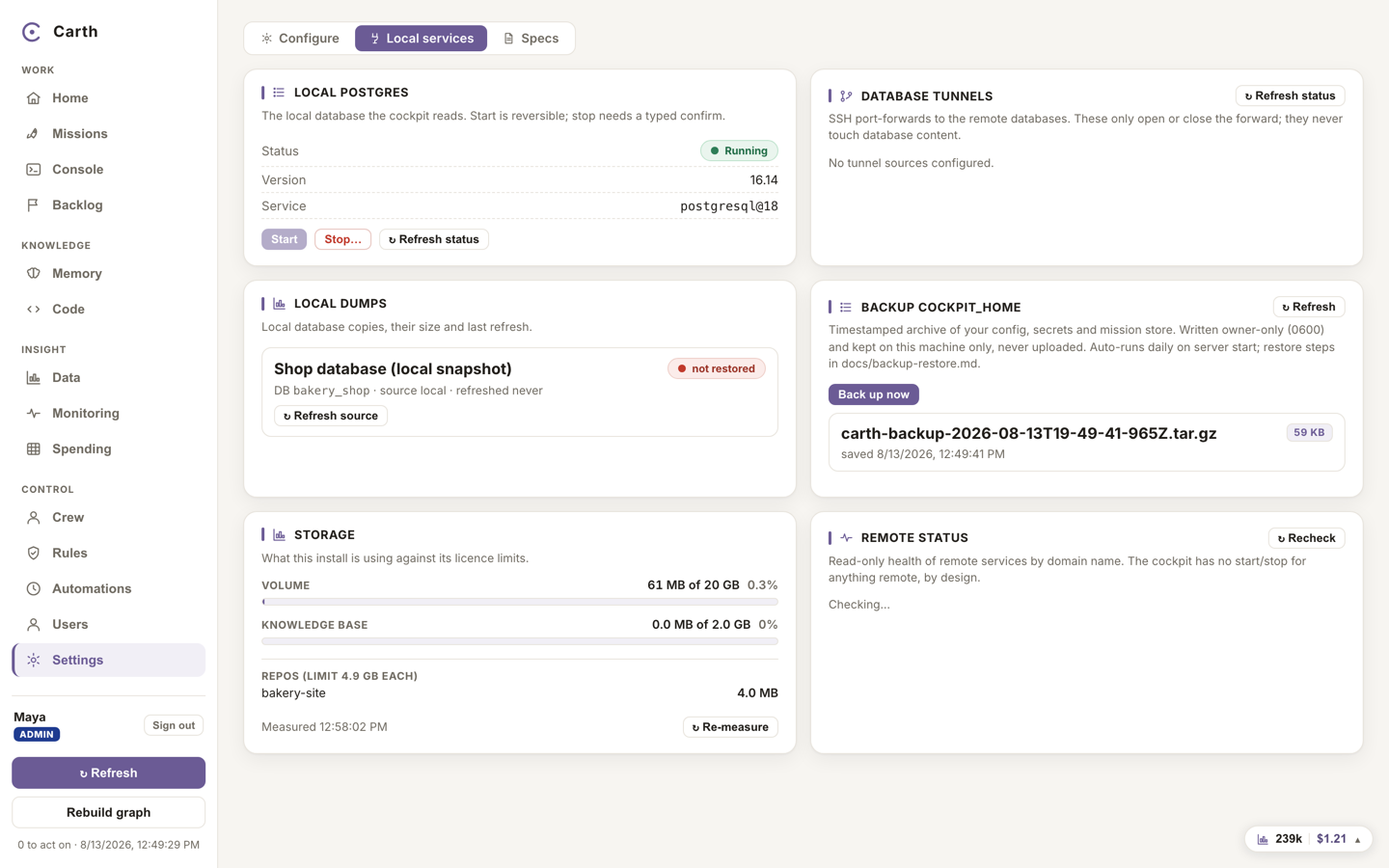
Your workspace stores your connected repositories, the crew's mission records and evidence, and your knowledge base. Each plan carries three allowances: the whole workspace, each single repository, and the knowledge base.
| Plan | Whole workspace | Per repository | Knowledge base |
|---|---|---|---|
| Trial (withdrawn) | 2 GB | 1 GB | 200 MB |
| Solo (withdrawn) | 5 GB | 2 GB | 500 MB |
| Team | 20 GB | 5 GB | 2 GB |
| Business | 60 GB | 15 GB | 6 GB |
| Enterprise | Negotiated | Negotiated | Negotiated |
When something would not fit, connecting a repository, uploading knowledge, the action is refused up front with the actual numbers: what you are using, what the plan allows. Nothing is half done, and nothing you already have is touched. The two real ways out are freeing space or moving up a plan, and the message says so. A storage meter in Settings, under Local services, shows one bar per allowance so you are never surprised.
Questions about your plan? Write to apply@carthagent.com and a person who understands the system will answer. For where your data lives and how it is protected, read how your work is kept safe.